edio.ai vs Ellii (ESL Library): which one fits your language school?
Ellii, formerly ESL Library, is one of the biggest libraries of ready-made English lessons, with digital homework for students. edio.ai is an AI-powered LMS for teaching languages live and running a school. Here is where each one fits.
7-day free trial · AI credits included · No credit card required
The short answer
Pick Ellii if you teach English only and want a huge library of printable lessons, flashcards and videos, with digital homework. Pick edio if you teach live online or run a language school: students work in the same lesson with you, AI builds lessons from your own topics and files, and lesson balances, attendance and teachers sit in one account. edio also works for languages other than English.
- ElliiBest forEnglish classrooms that print or project their materials
- edioBest forLive online teaching and language schools, in any language
Quick verdict
Ellii is a large English lesson library with digital tasks, homework and AI help with scoring. edio is a platform for live interactive lessons in many languages, with an AI lesson generator and tools to run a school.
Choose Ellii
- You teach English only and want thousands of ready-made lessons and flashcards
- You teach in a classroom and print or project your materials
- You want AI help to score writing and speaking homework
- Your program buys licences per teacher for a large library
Choose edio
- You teach online or in small groups and want the lesson itself to be interactive
- You want AI to build a whole lesson from your own topic, PDF or image
- You teach more than one language, or Polish as well as English
- You run a school and need lesson balances, analytics and several teachers in one account
Feature comparison
An honest side-by-side breakdown. Where Ellii is stronger, we say so directly.
| Feature | edio | Ellii | Better fit |
|---|---|---|---|
| Language teaching | |||
| Ready-made lessons | 621 interactive lessons: English A1–C1, Polish A1–B2 | Thousands of English lessons, flashcards and videos | Ellii |
| Live lesson space | Teacher and student work on the same lesson in real time. Video runs in Zoom or Meet alongside | The teacher presents tasks on a shared screen with the Digital Task Player | edio |
| Interactive exercises | 32 exercise types that check themselves: gap fill, drag-and-drop, matching, unjumble and more | Digital tasks such as multiple choice, matching, type in the blanks, image match and open questions | Tie |
| AI | Lesson generator builds a whole interactive lesson from a topic, PDF or image | Ellii Bot helps score writing and speaking answers | edio |
| Languages | 18 languages supported | English only | edio |
| Students and homework | |||
| Homework | Assign homework in your classes. Exercises check themselves and you see every answer | Assign digital tasks as homework, with results, feedback and the Grade Feed | Tie |
| Progress | Homework status by teacher and by student: submitted, checked, pending and needs revision | Completion and time-on-task reports | Tie |
| Printable materials | Lessons made for the screen, with exercises that check themselves | Every lesson as a printable PDF | Ellii |
| School management | |||
| Lesson balance | Tracks prepaid lessons per student, with change history | Not available | edio |
| Lesson analytics | Sessions, attendance rate, lesson duration and student feedback | Not available | edio |
| Multiple teachers | Owners, admins and teachers in one school account | Organisation accounts with admin tools and class sharing | Tie |
| General | |||
| Pricing | From €20/mo · 7-day free trial | A subscription per teacher, with plans for private teachers and schools | Tie |
See it in edio
What lesson prep, a live lesson and a school look like inside edio.
A whole lesson from one line
Type a topic, or upload a PDF or a picture, and get a complete interactive lesson in about a minute: reading, listening, grammar, vocabulary and speaking. Edit any exercise before you teach.
More about the AI lesson generator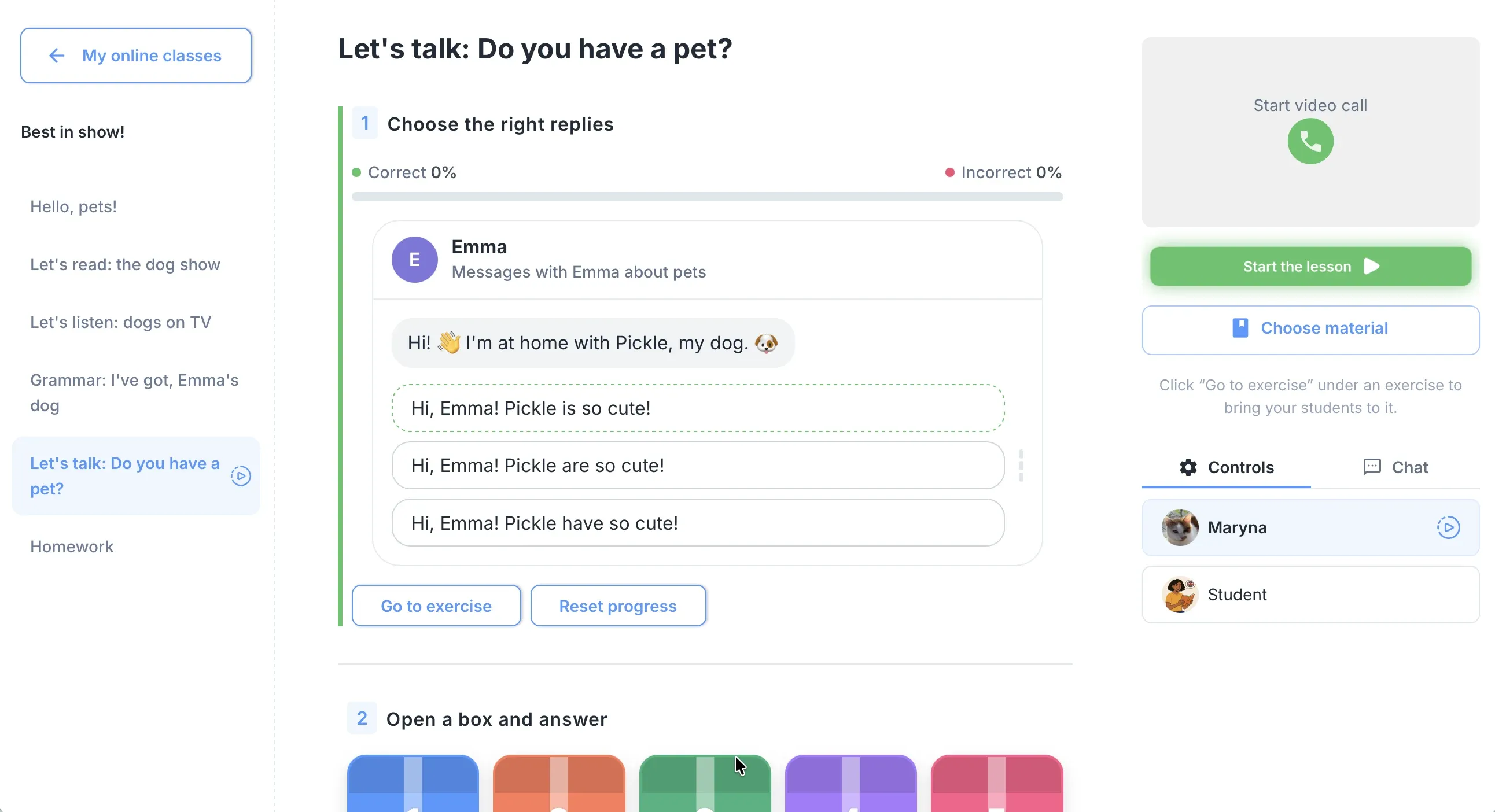
One lesson, live, for everyone
Students work in the lesson on their own screen and you see their answers as they type. Exercises check themselves, so the lesson keeps moving.
More about virtual classesThe school in one place
One calendar for every teacher, lesson balances that update after each class, chat, homework and analytics, all under one login.
More about school management
When Ellii makes sense
We'll be straight with you: for some teachers Ellii is the better pick.
Strengths
- A huge English library of lessons, flashcards and videos
- Every lesson as a printable PDF and as digital tasks
- Digital homework with results, teacher feedback and AI help with scoring
- New materials added every day
- Plans for schools, districts and libraries, plus Ellii Solo for self-study
Weaknesses for language schools
- English only, so no help with the other languages your school teaches
- Tasks are shown from the teacher's screen: students don't work in the same live lesson
- Built around its own library: turning your own materials into interactive lessons is not its focus
- No lesson balances, scheduling or lesson analytics for a school
Where edio wins for language schools
Ellii gives you materials for a lesson. edio is the place where the lesson happens.
Teaching advantages
- Teacher and students work in the same lesson in real time, and you see answers as they type
- AI builds a whole interactive lesson from your own topic, PDF or image in about a minute
- 32 exercise types that check themselves, in the lesson and in homework
- Ready-made lessons in English and Polish, and 18 languages for your own
Business advantages
- Lesson balance per student: see who is running low and top up in one click
- Attendance, homework and lesson history logged for every student
- One login for lessons, materials, student profiles, chat and analytics
- Several teachers under one school account, with no separate subscriptions
Real scenarios: what should you choose?
Specific situations, specific answers.
Scenario 1
English classroom with a printer
You teach English in a classroom, print or project your materials, and want a very large library of topics and flashcards.
Ellii works here
Scenario 2
Online tutor, one-to-one lessons
You teach on video calls and want students to work in the lesson themselves, with homework and progress in one place.
Choose edio
Scenario 3
School that teaches several languages
Your teachers teach English, Polish or other languages, and you need lessons, homework, attendance and lesson balances together.
Choose edio
Scenario 4
Teacher who wants both
You like Ellii flashcards and printables, and also want live interactive lessons and an AI lesson generator.
Use both side by side
How to switch from Ellii to edio
Three steps. You can teach your first edio lesson on the day you sign up.
Start a free trial
Sign up in a minute, with no credit card. The 7-day trial has every feature, for up to 5 students.
Prepare your first lessons
Start from the ready-made library, or generate a lesson from a topic, your own PDF or a picture. Keep Ellii for flashcards and printables if you like.
Add students and teach
Add students by email: each one gets an invitation with a login. Create a virtual class and teach your first lesson live.
Frequently asked questions
Is Ellii the same as ESL Library?
Can I use edio and Ellii at the same time?
Does Ellii have AI?
How much do Ellii and edio cost?
Which is better for a school that teaches more than English?
Try edio for your language school
7-day free trial · AI credits included · No credit card required