edio.ai vs Moodle: a Moodle alternative for language schools
An honest comparison for language school owners who run Moodle or are thinking about it. Moodle is a powerful, free and open-source LMS for any subject. edio.ai is an AI-powered LMS built only for language teaching. Here is where each one fits.
7-day free trial · AI credits included · No credit card required
The short answer
Moodle is a powerful, free and open-source LMS for any subject, if you have people to host, set up and maintain it. edio is a ready-to-use platform built only for languages: live interactive lessons, an AI lesson generator, ready-made lessons and the tools to run a language school, with nothing to install. For a language school without its own IT team, edio is usually the faster and simpler choice.
- MoodleBest forSchools with an IT team that teach many subjects
- edioBest forLanguage schools that want a ready platform, with nothing to install
Quick verdict
Moodle is the open-source LMS used by schools, universities and companies around the world. edio is built for one job: teaching languages live and running a language school.
Choose Moodle
- You teach many subjects, not only languages
- You have IT staff or a partner to host and maintain it
- You need deep customisation, plugins or standards like SCORM
- You want free, open-source software and full control of your site
Choose edio
- You run a language school or teach languages online
- You want live lessons where students work in the lesson with you
- You want AI to build whole language lessons, and ready-made lessons to start with
- You'd rather not run servers, updates and plugins
Feature comparison
An honest side-by-side breakdown. Where Moodle is stronger, we say so directly.
| Feature | edio | Moodle | Better fit |
|---|---|---|---|
| Language teaching | |||
| Interactive exercises | 32 exercise types built for language practice: gap fill, drag-and-drop, matching, word cards, listening and speaking | Quizzes with many question types and interactive H5P content, built for any subject | edio |
| Live lesson space | Teacher and students work in the same lesson in real time. Video runs in Zoom or Meet alongside | Video classes through an integration such as BigBlueButton. Activities aren't synced live between teacher and student | edio |
| AI for lesson prep | AI builds a whole interactive lesson from a topic, PDF or image, in 18 languages | Since 4.5, AI writes text and images in the editor and summarises course text, once an admin connects a provider | edio |
| Ready-made lessons | 621 interactive lessons: English A1–C1, Polish A1–B2 | No language lessons included. You build courses or bring in shared resources | edio |
| School management | |||
| Lesson balances | Prepaid lessons tracked per student, with change history | Not built in. Needs a plugin or a separate tool | edio |
| Scheduling | One school calendar, recurring lessons, working hours for every teacher | Calendar built in. Booking lesson slots needs a plugin such as Scheduler | edio |
| Roles and permissions | Owners, admins and teachers in one school account | Very detailed roles and permissions, for any size of institution | Moodle |
| Reports | Attendance, lesson statistics, homework status and student progress | Gradebook and detailed activity reports, with more from plugins | Tie |
| General | |||
| Price | From €20/mo · 7-day free trial | Free, open-source software. You pay for hosting, setup and upkeep, or a MoodleCloud plan | Moodle |
| Setup and upkeep | Sign up and teach the same day. No server, updates or plugins to look after | Install, host, update and maintain it yourself, or use MoodleCloud, which doesn't allow plugins | edio |
| Customisation | White label: your logo, your domain and school-branded emails | Fully customisable: themes, plugins and your own code | Moodle |
| Subjects | Built only for language teaching | Any subject, from schools to universities and companies | Moodle |
See it in edio
What lesson prep, a live lesson and a school look like inside edio.
A whole lesson from one line
Type a topic, or upload a PDF or a picture, and get a complete interactive lesson in about a minute: reading, listening, grammar, vocabulary and speaking. Edit any exercise before you teach.
More about the AI lesson generator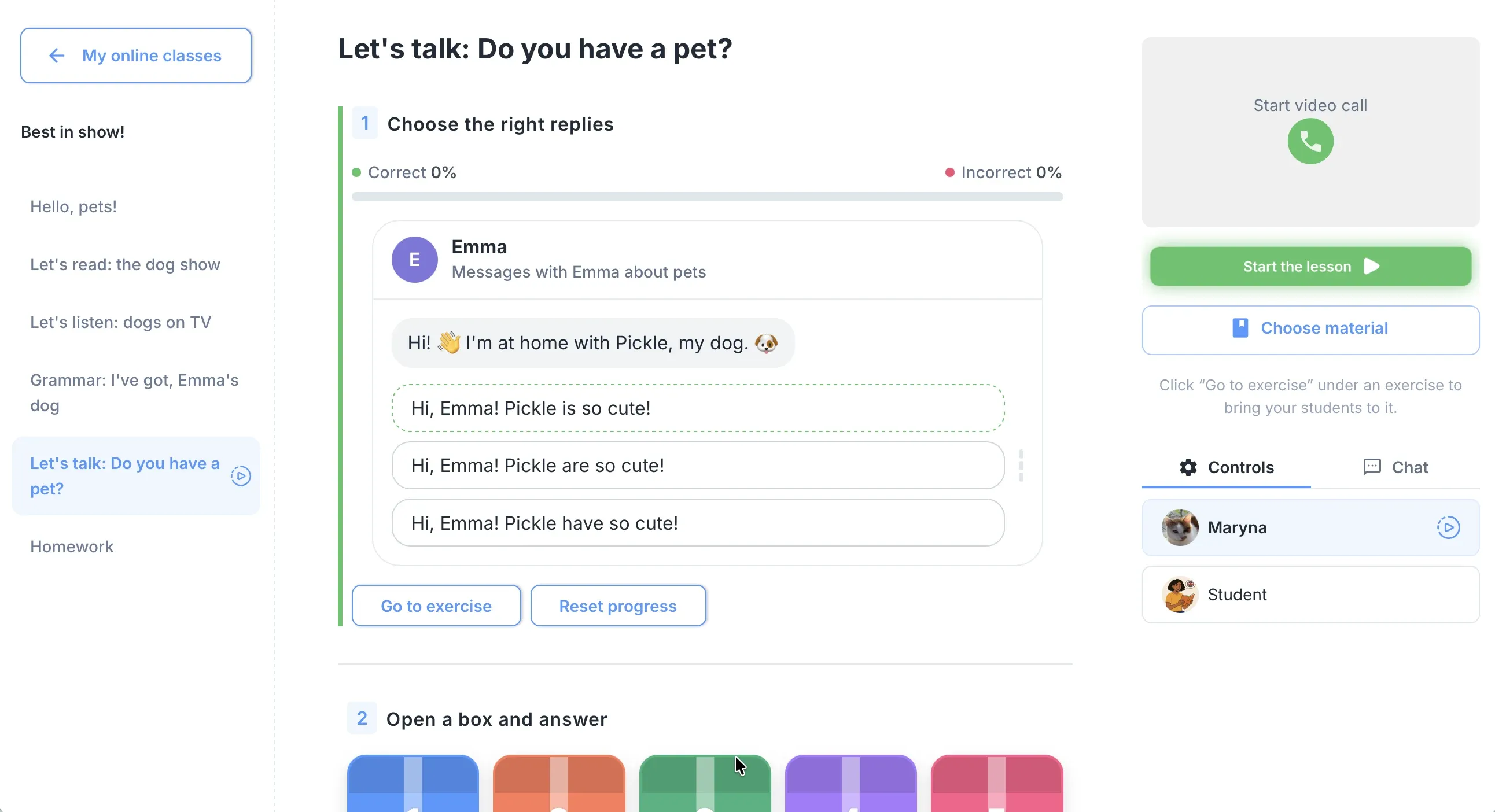
One lesson, live, for everyone
Students work in the lesson on their own screen and you see their answers as they type. Exercises check themselves, so the lesson keeps moving.
More about virtual classesThe school in one place
One calendar for every teacher, lesson balances that update after each class, chat, homework and analytics, all under one login.
More about school management
When Moodle makes sense
Moodle is excellent at what it was built for. These are the situations where it's the better pick.
Strengths
- Free and open source, with a large community
- A big plugins directory and full control over your site
- Mature quizzes, gradebook and reporting
- Standards such as SCORM and LTI
- Works for any subject and any size of institution
Weaknesses for language schools
- Someone has to host, update and maintain it
- No live lesson where teacher and student work in the same exercises
- No tracking of prepaid lessons, and lesson booking needs a plugin
- AI helps write text, but doesn't build a ready interactive lesson
- No ready-made language lessons
Where edio wins for language schools
Moodle is a course platform for every subject. edio is a lesson platform for languages.
Teaching advantages
- The lesson happens inside edio: teacher and students in the same exercises, with answers appearing as students type
- AI turns a topic, PDF or image into a complete interactive lesson in 18 languages, ready to edit
- 621 ready-made lessons for English A1–C1 and Polish A1–B2, to teach as they are or copy from
- Exercises check themselves, so homework is marked before you open it
Business advantages
- Lesson balance per student: always know who is running low on prepaid lessons
- One school calendar with every teacher, group and one-to-one lesson
- Chat, attendance and analytics in the same place as the lessons
- Nothing to install or update, and white label when you want your own brand
Real scenarios: what should you choose?
Specific situations, specific answers.
Scenario 1
University or multi-subject school
You teach many subjects, need standards like SCORM, and have an IT team that already runs your systems.
Moodle fits here
Scenario 2
Private language school, 3–10 teachers
Live group and one-to-one lessons, prepaid lesson packages, one schedule for every teacher, and no IT staff.
Choose edio
Scenario 3
Online tutor or small school
You want to teach today, with lessons you don't build from scratch and nothing to install.
Choose edio
Scenario 4
Language school already happy on Moodle
Your courses and records live in Moodle, but your live lessons feel like screen sharing.
Add edio for live lessons
How to switch from Moodle to edio
Three steps. You can teach your first edio lesson on the day you sign up.
Start a free trial
Sign up in a minute, with no credit card. The 7-day trial has every feature, for up to 5 students.
Rebuild lessons with AI, not by hand
Upload the PDFs and worksheets from your Moodle courses, and the AI generator turns each one into an interactive lesson you can edit. Or start from the ready-made library.
Add students and teach
Add students by email: each one gets an invitation with a login. Create a virtual class and teach your first lesson live.
Frequently asked questions
Is edio.ai a good Moodle alternative for language schools?
Is Moodle free?
Does Moodle have AI?
Can I move my Moodle courses to edio?
Can I use edio and Moodle together?
Which is easier to run for a small language school?
Try edio for your language school
7-day free trial · AI credits included · No credit card required