





15,000+
Students learning with edio
110,000+
Lessons conducted on the platform
18 hours
Saved per teacher every week
Everything happens on one platform
Create the lesson
Generate it with AI from a topic, PDF, or image, or build it by hand. 32 interactive exercise types, 17 languages
Teach it live
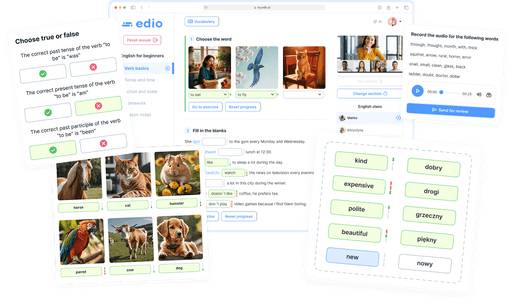
Teacher and student work in the same lesson at the same time, not just on a shared screen
Manage everything else
Scheduling, chat, lesson balances, and progress, all in one place
AI lesson generator
Generate lessons from a topic, PDF, or image
Type a topic or upload a file, and edio builds a complete lesson with exercises, ready to edit before class. Works across 17 languages
Generate a lesson for free
Virtual classroom
Teach online lessons in a virtual classroom
Teacher and student see the same lesson at the same time. Every answer appears as it is typed, mistakes are checked automatically, and vocabulary can be sent mid-lesson
Real-time sync
Automatic checking
Built-in vocabulary
Built-in chat
Grades & feedback
Interactive homework
Start teaching free
School management
Manage your language school in one place
Scheduling, chat, lesson balances, and student progress, all without spreadsheets or separate tools
Less time on prep and grading. edio takes care of the routine
Before

Every fresh topic means planning a lesson by hand
Hours of lesson prep from scratch
Static books and PDFs, barely any student interaction
Manually checking all student answers
Lessons, chat, scheduling and balance tracking spread across different apps and spreadsheets


With edio

AI-generated lessons from a topic, PDF or image, ready in minutes
Create lessons in any of 17 languages, or start with ready-made ESL materials in English
32 interactive exercise types that keep students engaged
Automatic answer checking and instant feedback for students
Everything in one platform, no switching between tools: built-in chat, analytics, lesson-balance tracking, and scheduling

Olia Padiak
Co-Founder of Bee for Biz — an English school for business and professionals

Yuliia Hlukhonina
Anastasiia Rusina
Founder of Polyglot Online School

How is the AI lesson generator different from a general AI chatbot?
A chatbot gives you text you still have to turn into a lesson. edio generates a complete interactive lesson with exercises that students can open and complete right away, with answers checked automatically. You can edit any exercise before the class or regenerate parts of it.
Can I use edio for individual lessons?
Yes! edio allows you to host real-time, one-on-one lessons with your students, complete with live video calls, real-time synchronization, and interactive tools.
Do you support group lessons?
Yes, edio supports group lessons. You can invite multiple students to join a virtual class, and all interactions are synced in real-time to ensure a collaborative learning experience.
Can I have an interactive lesson in edio?
Absolutely! edio is built for interactive teaching. You can create dynamic lessons using various interactive elements, live quizzes, vocabulary builders, and real-time student responses.
Can I create and manage an online course?
Yes, you can create self-paced online courses with edio. Set time limits, monitor student progress, and use automated tools to check assignments and track completion.
Can I customize edio with my own branding?
Yes! Our white-label solution allows you to fully customize edio with your logo and domain, giving your language school a unique, professional look.
Which integrations does edio support?
edio integrates seamlessly with platforms like Miro, Quizlet, Google Meet, Zoom, and WordWall, making it easy to enhance your lessons with interactive tools and video conferencing.
How do I get started with edio?
Sign up for free and get 7 days of trial access, no credit card required. If you'd prefer a personal walkthrough first, you can also book a demo with our team.