Interactive lessons vs PDF lesson plans: which works better online?
PDF lesson plans were made for the classroom. Online, students watch your screen and you check every answer by hand. Here is an honest comparison, with the cases where a PDF is still the better choice.
7-day free trial · AI credits included · No credit card required
The short answer
PDF lesson plans still work best in a classroom with a printer and no devices. Online, they turn the lesson into watching your screen and checking answers by hand. edio lessons are just as ready to teach, but students work in them on their own device, the exercises check themselves, and homework and progress stay in one place.
- PDF lesson plansBest forClassrooms with a printer and no devices
- edioBest forOnline lessons where students do the exercises themselves
Quick verdict
A PDF lesson plan is a ready worksheet to print or show. An edio lesson is ready too, but students work in it themselves, and the exercises check themselves.
Choose PDF lesson plans
- Teach in a classroom and hand out printed sheets
- Your students have no computers, tablets or phones in class
- Need lessons that work without the internet
- Want the biggest choice of topics from many sites
Choose edio
- Teach online, one-to-one or in groups
- Want students to do the exercises, not watch your screen
- Are tired of checking answers by hand after class
- Want lessons, homework and progress in one place
Feature comparison
Side by side, for teaching online. Where a PDF is the better choice, we say so.
| Feature | edio | PDF lesson plans | Better fit |
|---|---|---|---|
| In the lesson | |||
| What you get | An interactive lesson that opens in the browser | A file to print, download or show on screen | Tie |
| Teaching online | Teacher and students work in the same lesson, and answers sync as they type | You share your screen; students answer out loud or in the chat | edio |
| Checking answers | Exercises check themselves while students work | You check every answer yourself, during or after class | edio |
| New words | Word cards with a picture, audio and an English definition | A word list, sometimes with audio as a separate file or link | edio |
| Teaching in a classroom | Students work on a computer, tablet or phone, in the browser | Print and hand out: no devices needed | PDF lesson plans |
| Before and after class | |||
| Homework | Assign exercises that check themselves | Send the file; students send back photos or documents to check | edio |
| Student progress | Grades and progress for every student in one place | Kept in your own notes or spreadsheets | edio |
| Changing a lesson | Copy any chapter or exercise into your own lesson and change it there | Depends on the file: a PDF is hard to edit | edio |
| Your own materials | Upload a PDF and the AI lesson generator turns it into an interactive lesson | Stay as they are | edio |
| General | |||
| Number of lessons | 621 ready-made lessons on the site: English A1–C1 and Polish A1–B2 | Large archives built up over years, on many sites | PDF lesson plans |
| Price | From €20/mo with a 7-day free trial: the lessons and the whole platform | Free worksheets, or a subscription to a lesson site | Tie |
See it in edio
What lesson prep, a live lesson and a school look like inside edio.
A whole lesson from one line
Type a topic, or upload a PDF or a picture, and get a complete interactive lesson in about a minute: reading, listening, grammar, vocabulary and speaking. Edit any exercise before you teach.
More about the AI lesson generator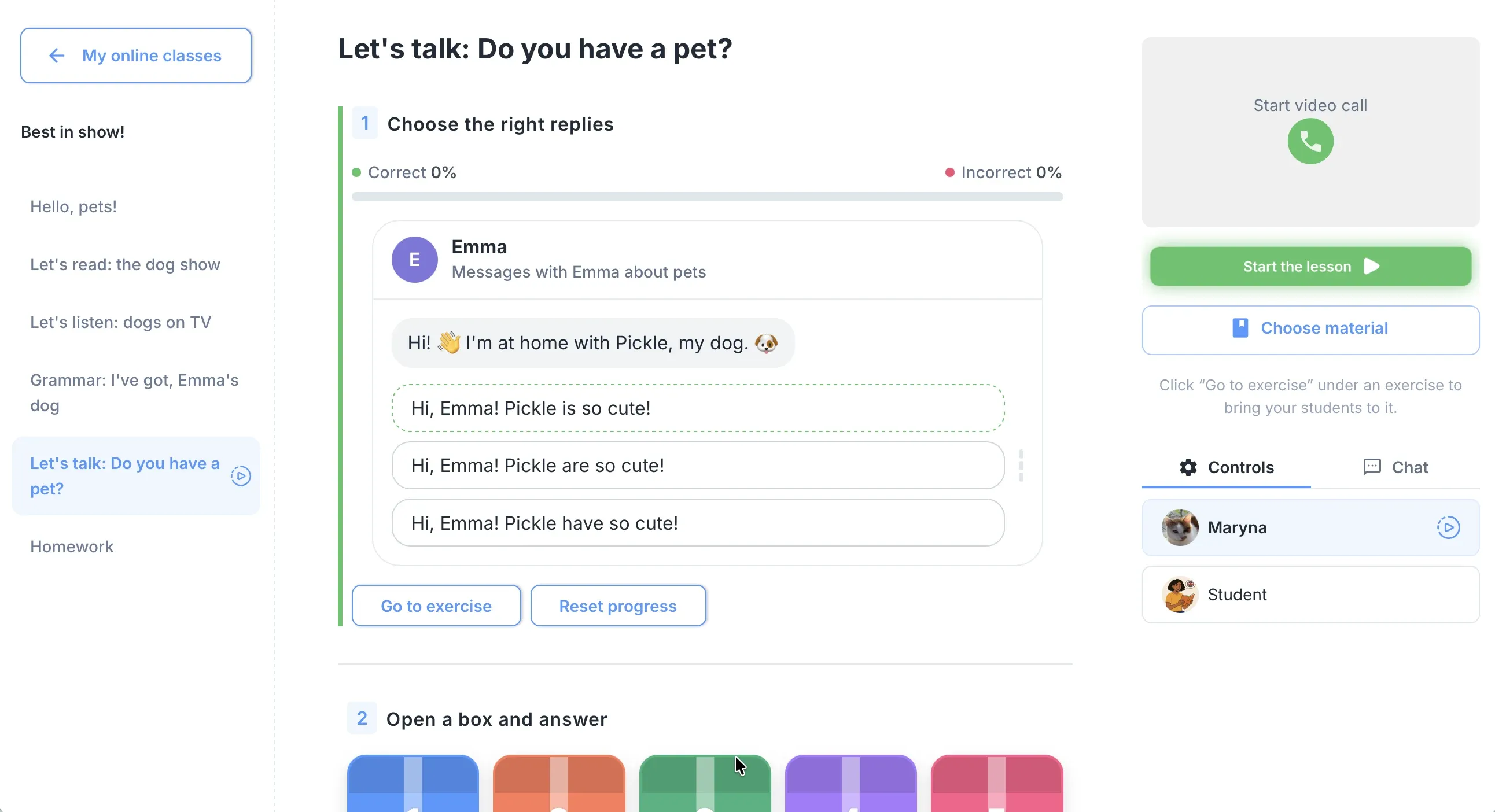
One lesson, live, for everyone
Students work in the lesson on their own screen and you see their answers as they type. Exercises check themselves, so the lesson keeps moving.
More about virtual classesThe school in one place
One calendar for every teacher, lesson balances that update after each class, chat, homework and analytics, all under one login.
More about school management
When PDF lesson plans make sense
A PDF is a good tool for the job it was made for: a lesson on paper.
Strengths
- Print and teach: no devices or internet needed
- Huge choice of topics across many sites, many of them free
- Easy to keep: a folder of files that is always there
- Teacher notes and answer keys often come with the lesson
Weaknesses for online teaching
- Students watch a shared screen instead of working themselves
- Every answer is checked by hand, in class or after it
- Homework comes back as photos and documents
- No record of what each student did or how they did it
- Hard to change: editing a PDF takes extra tools and time
Where edio wins for online lessons
A PDF shows the lesson. In edio, students do it.
In the lesson
- Students work in their own accounts, and you see every answer as they type
- 32 exercise types, from matching and gap fill to games and speaking tasks
- New words come with pictures and audio, right in the lesson
- Exercises check themselves, so class time goes on speaking, not on checking
Before and after class
- 344 ready-made English lessons from A1 to C1: open one and teach
- Homework that checks itself, with grades and progress for every student
- Copy any chapter or exercise into your own lessons and change it
- Upload your own PDFs and turn them into interactive lessons with AI
Real scenarios: what should you choose?
Specific situations, specific answers.
Scenario 1
Classroom teacher with a printer
You teach groups in a classroom where students have no devices, and you hand out sheets at the start of the lesson.
PDF lesson plans work here
Scenario 2
Online tutor, one-to-one
You teach on Zoom or Meet and share a PDF on screen. You want students to do the exercises themselves and stop checking answers after class.
Choose edio
Scenario 3
Tutor with a folder of PDFs
You have years of your own materials and lesson plans you trust, and you want them to work online.
edio: upload your PDFs to the AI generator
Scenario 4
Language school with several teachers
Every teacher uses different files, and you want the same quality lessons for all students and to see their progress.
Choose edio
How to move from PDFs to interactive lessons
Three steps. You can teach your first edio lesson on the day you sign up.
Start a free trial
Sign up in a minute, with no credit card. The 7-day trial has every feature, for up to 5 students.
Turn your PDFs into lessons
Upload a PDF worksheet of your own, and the AI generator turns it into an interactive lesson with exercises that check themselves. Or start from the ready-made library.
Add students and teach
Add students by email: each one gets an invitation with a login. Create a virtual class and teach your first lesson live.
Frequently asked questions
What is the difference between an interactive lesson and a PDF lesson plan?
Can I use my PDF lessons in edio?
Are interactive lessons better for online teaching?
Which levels do the ready-made lessons cover?
How much does edio cost?
Try edio for your language school
7-day free trial · AI credits included · No credit card required